



6 min readBuilding
Why I am building FORMA
Writing and debugging the same kind of ETL logic again and again left me with a question about messy data. FORMA is where I am testing it.
The repetition
A lot of my work with data has been preparation. Before anything can be analysed or loaded, someone has to open the source, work out what it actually contains and turn it into something a system can rely on. For a while that meant Excel templates and VBA. Later it meant Python for the recurring parts.
The tools changed, but the routine stayed close to the same. I would open a messy file and read it until I understood its quirks. I would write the transformation, run it, look at the output, find the rows that did not fit and go back to the code. Then I would check the result against the rules the data was supposed to follow, and often go back again.
No single step was hard. What I noticed was how much time went into moving between them. The source sat in one window, the code in another, the output somewhere else, and validation was usually a separate script or a manual check. A lot of my debugging was holding all four in my head and trying to see where they disagreed.
The question
After enough rounds of this I started wondering whether working with messy data could be more direct.
I did not want to remove the engineering. The code is what makes a pipeline repeatable and reviewable, and it is what lets it run without me watching. Tools that hide the code tend to work until the data does something unexpected, and messy data always does eventually.
So the question I kept was narrower. Could I cut out some of the back and forth while keeping every decision visible and every step reproducible as code?
The idea
I wanted the data at the centre, with the pipeline growing out of what I do to it. I see the source. I select the part that matters, whether that is a column, a value or a pattern buried in a messy field. I apply a transformation and look at the result before accepting it. I check it against explicit rules. I run the whole pipeline. Then I export it as code that does the same thing.
That sequence became FORMA’s core loop: see, select, transform, verify, run, export. Underneath it is the engineering sequence I was already following by hand, from source and selection through extraction, cleaning, transformation and validation to the load.
The export mattered most to me. If the visual work could not leave the tool as readable code, I would only be trading one kind of lock-in for another.
Building the first version
Because of that, the first thing I built had no interface. It was the pipeline specification, a deterministic engine in TypeScript that runs it in the browser, a generator that writes the same pipeline as pandas code, and a parity suite that runs both on the same files and checks that they agree cell for cell.
The workbench came after. It is arranged around the data instead of around configuration. The source, a preview, the inspector for the current step, a before and after comparison and a profile of the selected column sit side by side. Validation is a set of explicit rules, and rows that fail are held back in a review queue instead of being loaded quietly.
Starting with the engine made the interface work calmer. Whenever I changed a screen, I did not have to wonder whether the exported code still matched it. The parity tests kept asking that question for me.
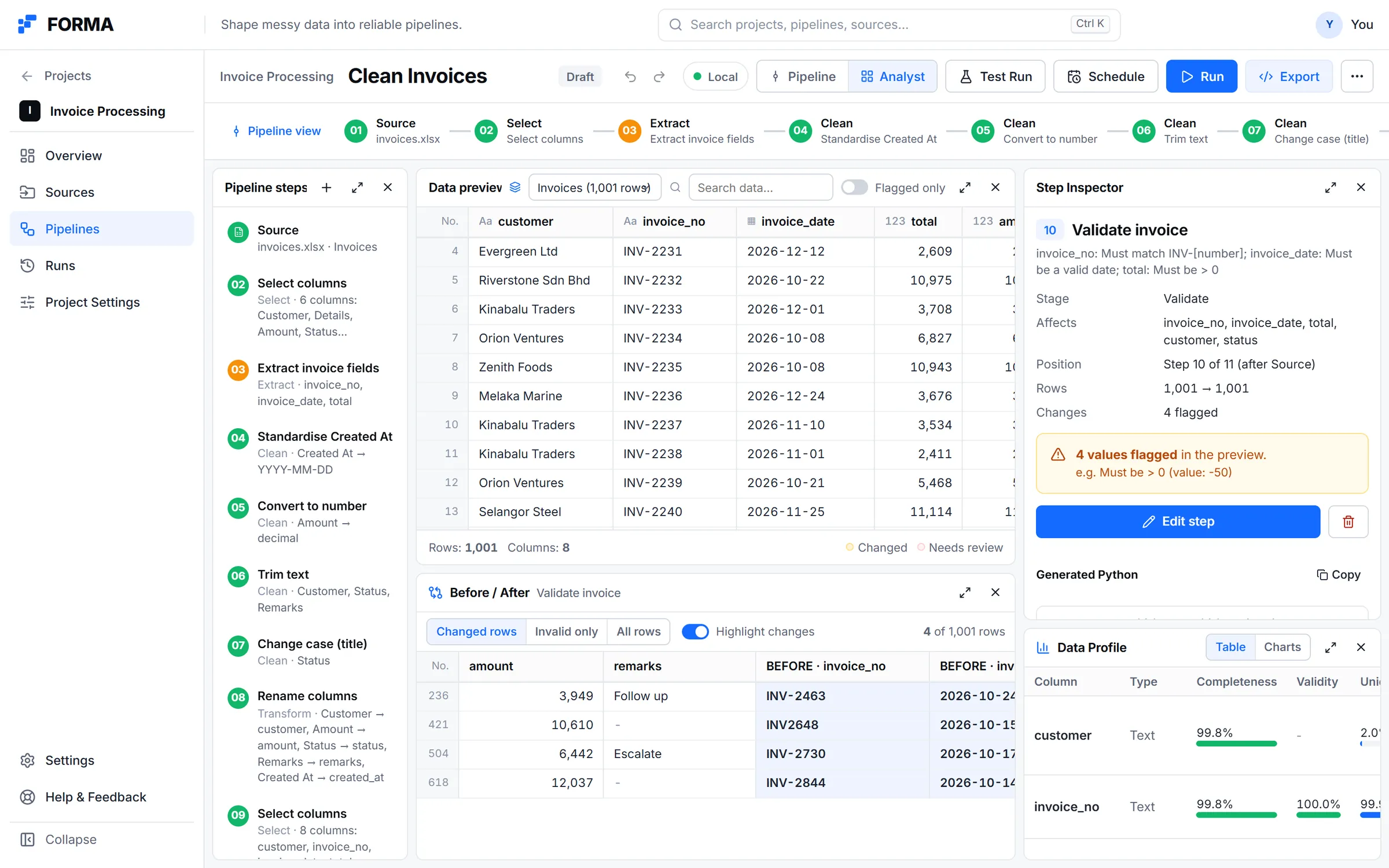
The analyst workbench on FORMA’s built-in example project: steps, the data preview, before and after for the selected step, and the data profile.
Real product · Built-in example project and sample dataWhat changed
Two things changed while I built it. Both came from the data more than from any plan.
The first was about sources. I had treated an uploaded workbook as one source, but useful data is often spread across sheets, and a pipeline might read a lookup table from another sheet of the same file. Making every sheet its own source fixed a bug where two steps reading different sheets of one file both ended up reading the same sheet. It also pushed me to organise FORMA around projects, where a source is stored once and pipelines refer to it.
The second was the pipeline view. My first version was a list of ordered step cards, and I was deliberate that it should not be a node editor. FORMA’s product document says to prefer working with the data itself over configuring abstract nodes. Soon after, I replaced the cards with a canvas where steps can be moved freely.
The cards made a simple chain easy to read. They could not show the shape of a pipeline once a step pulled in a second source for a join or a lookup. On the canvas, that second source appears as its own node feeding the step that uses it. The rule I held on to is that layout must never change behaviour. Position is visual, connection is logical and execution is deterministic. Node positions are stored apart from the pipeline specification, so moving a box cannot change what runs or what code is generated.
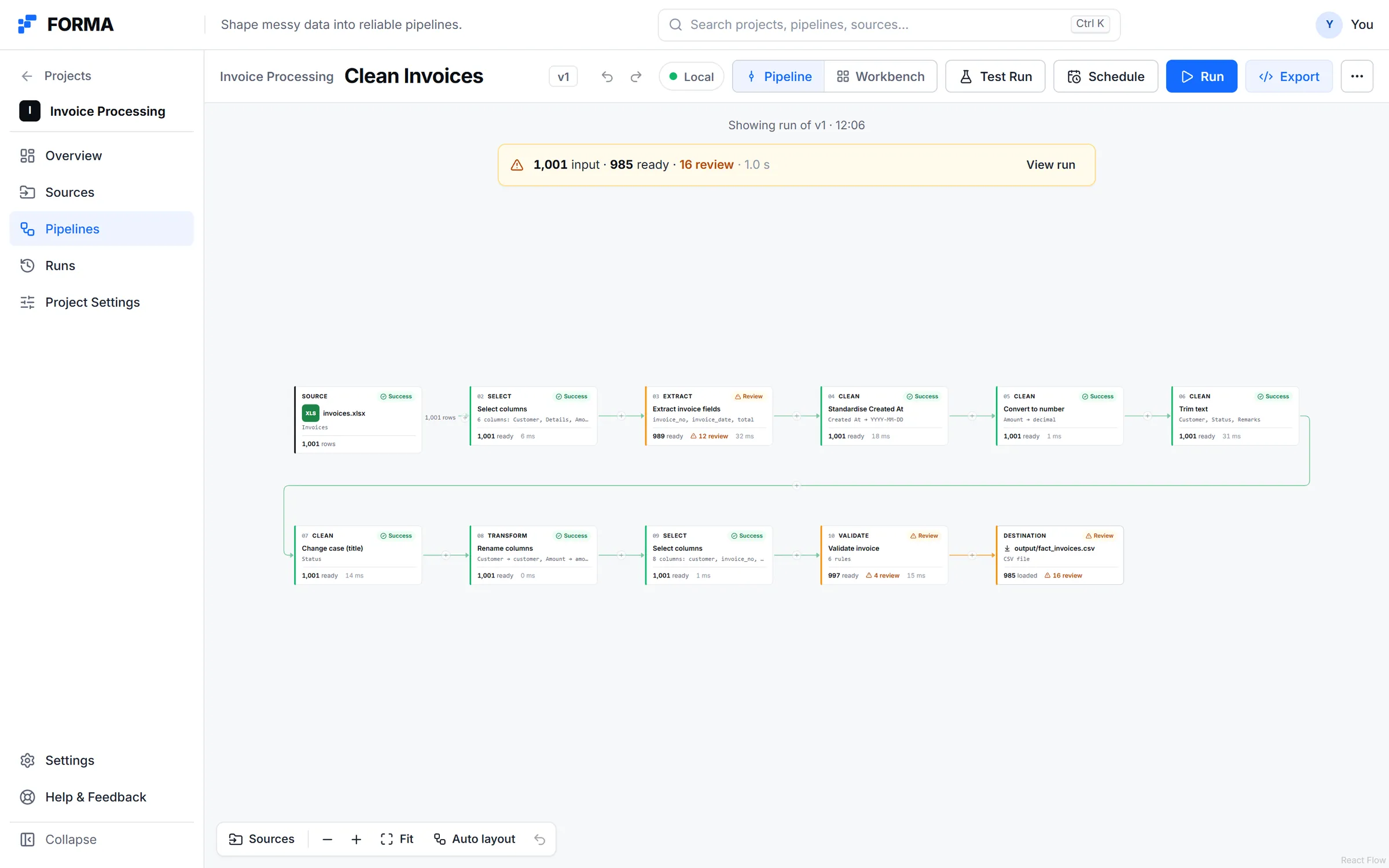
The pipeline canvas after a run on the example project: 1,001 rows in, 985 ready and 16 held back for review.
Real product · Built-in example project and sample dataWhat FORMA is not
It is not meant to replace Python, SQL or an orchestration platform. It is a quicker way to build and understand a deterministic data preparation pipeline, and the result is meant to leave with you: a single pipeline.py, or a full project with requirements, configuration and a README, plus an Airflow DAG or a Prefect flow.
It is also not a place to upload a CSV and let AI fix it. One rule in the product document is that AI can assist but should never be the hidden execution engine, and that the core workflow should not depend on a language model. When a row cannot be transformed or validated with confidence, I would rather show it to a person. That is what the review queue is for.
Where it is now
FORMA is active. On its built-in example project the loop works end to end, from a workbook to exported code. The case study has the screens and the details of what each part does, so I will not repeat them here.
It also has a clear edge. Collaboration, SQL and Polars as code targets, branching pipelines, an in-browser Python parity check, lineage and Git integration are not in this build.
What I am still figuring out
The canvas is the decision I am least sure about. It solved a real problem, but it pulls against the principle I started from, because a canvas of nodes is exactly the kind of abstraction I wanted to spend less time in. My working answer is that the canvas is the map and the workbench is where the work happens. Opening a step takes you back to the data. I do not know yet whether that split holds when a pipeline has thirty steps instead of eleven.
I am also unsure how visible the code should be. Each step can show its generated Python, and the engineer view puts the code beside the canvas. Whether people read it, or only want to know it is there, is something I will only learn by watching other people use it.
Branching is another open question. A pipeline is currently one chain in execution order, with supporting sources joining in along the way. Real cleaning logic sometimes splits, with one rule for some rows and another for the rest. I have not worked out how to show that without losing the straight line that makes a pipeline easy to follow.
I have also not decided what should happen when someone edits the exported code by hand. For now, export is a handoff. Whether FORMA should ever take those changes back is a bigger question than it looks.
FORMA started with a small frustration in my own routine: too many windows, similar code written again, and debugging that was mostly remembering. It is still the place where I test one question, whether working with messy data can be more direct without giving up the engineering. On the example project, the loop works. The questions above are what I am working through next.